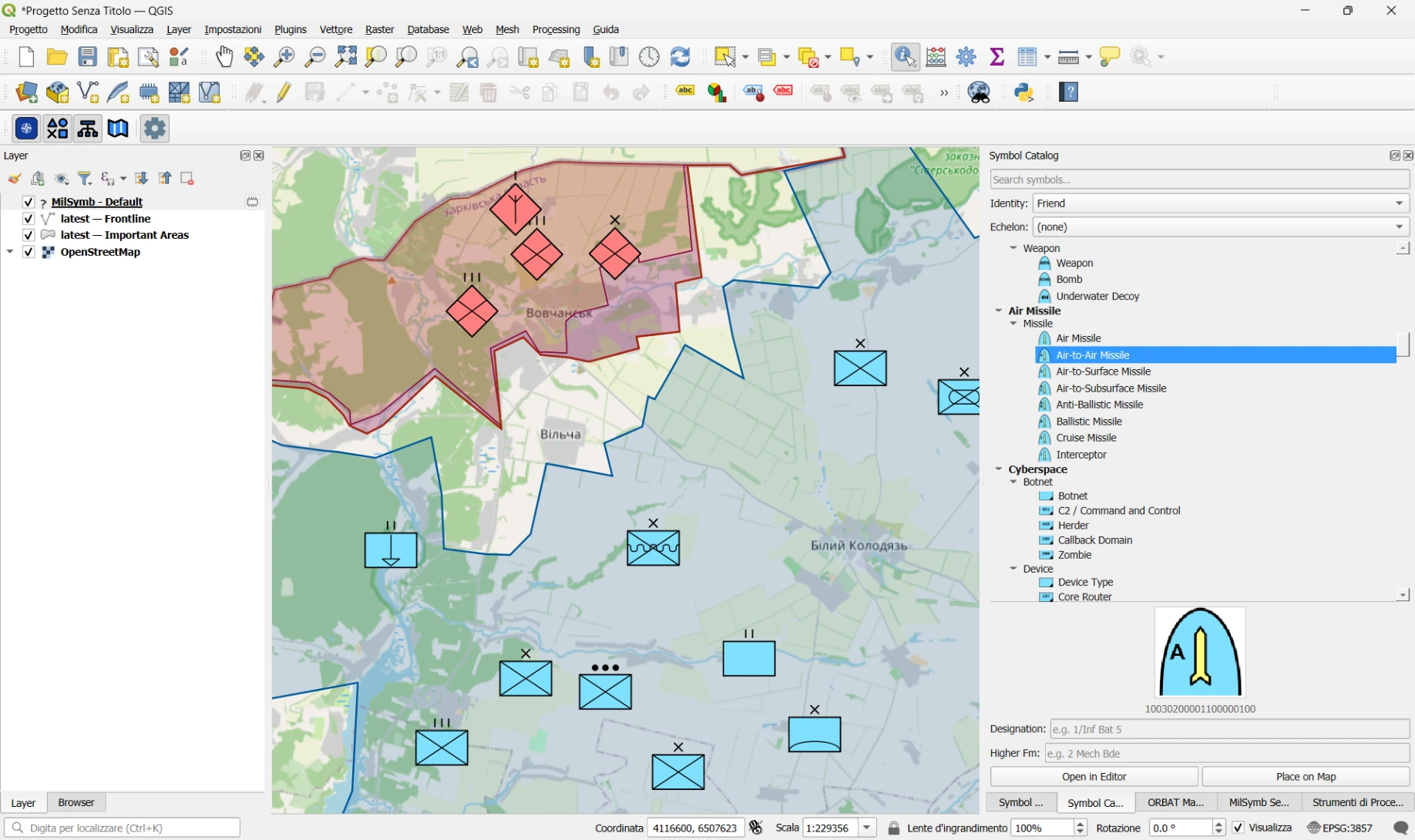
How many times, working with geographic data in defence or security contexts, have you wished you could draw NATO APP-6(D) tactical symbols directly on a QGIS map — without giving up all the analytical tools QGIS already offers?
That is exactly what we built.
What is APP-6(D)?
APP-6(D) is a public standard. It's the NATO Joint Military Symbology standard (Edition D, Version 1), officially published in October 2017.
- Primary source: NATO Standardization Agreement (STANAG) distribution system at https://nso.nato.int/ — this is NATO's official standards repository where you can access the APP-6(D) document directly.
- Direct reference (from search results): The document is sometimes referenced as APP-6 Edition D Version 1 and covers NATO land military symbology for symbols, icons, and their identification codes.
What is QGIS APP-6(D)?
QGIS APP-6(D) is an open-source plugin for QGIS 3 that brings the NATO military symbology standard directly into the GIS environment you already know. No proprietary software, no external dependencies: the plugin works with a standard QGIS 3.16 installation or later.
With just a few clicks you can:
- Browse and search the full APP-6(D) symbol catalog — over 2 000 symbols organised by symbol set
- Drag and drop a symbol onto the map and position it in WGS-84
- Assign text modifiers — designation, higher formation, operational status
- Manage multiple symbol layers stacked on top of each other, each exportable to JSON
- Build an ORBAT (Order of Battle) hierarchy and link it to map symbols
- Filter symbols through time thanks to the integration with the QGIS Temporal Controller
How rendering works
At the heart of the plugin is a small local HTTP server running as a background thread inside the QGIS process. The server handles requests like `/symbol/<SIDC>.svg` and returns an SVG generated by the milsymbol.js JavaScript library — the same library used by several other open source tools for tactical visualisation. Symbols are then loaded as `QgsSvgMarkerSymbolLayer` instances on in-memory vector layers: no external files, no additional database.
Why open source
Military symbology is a public standard (NATO APP-6(D)). We believe the tools to work with it should be equally open, auditable, and maintainable by anyone who needs them — armed forces, civil protection agencies, humanitarian organisations, researchers.
The code is released under the GPL-2.0 licence and available on GitHub:
👉 github.com/intelligeo/qgis-app6d-plugin
How to try it
1. Download the latest ZIP from the Releases page
2. Open QGIS → Plugins → Manage and Install Plugins → Install from ZIP
3. Select the file and click Install Plugin
For a step-by-step walkthrough see the QUICKSTART guide.
Meanwhile, the plugin as been published in the official QGIS Plugins Repository.
What is coming next
Features we are exploring for v0.2:
- Import / export in ORBAT Mapper JSON format
- Support for other symbols families (e.g. Civil Protection and Humanitarian Aid)
- A SIDC search panel with live symbol preview
- Implementing n-points symbols for tactical graphics like sectors, lines of action, movements and many more
- Any other idea? Just contribute!
Support my work

INTELLIGEO.ch is a GIS consulting company based in Switzerland. We develop custom geospatial solutions for clients in the environment and infrastructure sectors.
Questions or collaboration: ask@intelligeo.ch